Effective Ways For Hardening WordPress
Published: 2026-02-06
When it comes to WordPress Website Security, you can do a lot of things to prevent your website or blogs from hackers. Since WordPress websites are easy to hack, the CMS is often targeted by hackers to carry out malicious activities. While there is no foolproof method, you can still make yourself familiar with WordPress hardening methods because the consequences of not having them in place can be detrimental.
In simple terms, the Hardening WordPress Website can be defined as applying efficient and effective security measures. While it is imperative to have a WordPress security plugin to scan and clean your website, you also need to put hardening measures in place to make it more robust.
Mistakes During Hardening WordPress
Before we dive into the methods of hardening your WordPress website, let us first discuss what are the common mistakes people make while hardening their WordPress websites:
1. Not Backing Up Your Website
The number of online threats, on a daily basis, has witnessed a significant surge. Besides, online hackers use more and more sophisticated methods to carry out malicious activities. Therefore, it is imperative that you have an effective WordPress database backup plan in the first place. You have to ensure that you use the best WordPress backups:
- First and foremost, backup your database along with your files containing plugins, themes, wp-content folder, .htaccess file, and wp-config.php file, etc.
- The frequency of the backup will entirely depend on the frequency of the changes that you make on your website. Let us assume you publish content several times in a week, then in that scenario, you should take a daily backup instead of a weekly backup.
- You also have to ensure that you save the backup offsite and in several different locations.
- Lastly, make it a habit of checking the backups on a daily basis to make sure they function as they should be.
2. Not Applying Updates
Regular updates are essential for WordPress websites. They contain security patches and improvements. While WordPress core updates are automatic, minor updates (such as for plugins and themes) often require manual installation. Ignoring updates can leave your website vulnerable to security risks, so make sure to keep everything up to date.
3. Using Weak Passwords
Using weak or commonly used passwords (like your name or birthdate) is a major security risk. Make sure to choose strong, unique passwords for your WordPress admin area, email, and hosting control panel. A strong password includes a mix of upper and lower case letters, numbers, and symbols. Change your passwords every six months to improve security.
4. Leaving Your Login Area Unprotected
Your WordPress login page is a target for hackers. If you're using WordPress for a while, you probably know how to access it—but so do the hackers. Protect your login area by changing the display name in the user section. Also, limit login attempts to prevent brute-force attacks and consider using Two-Factor Authentication (2FA) for extra protection.
5. Not Using a Secure Web Host
Today WordPress hosting varies from cheap shared hosting to more expensive and efficient Managed WordPress Hosting and dedicated web servers. That said, not all hosting providers are equal. Some of them are more secure than others and this particular element is reflected in their pricing plans.
6. Using Poorly Coded Themes and Plugins
Poorly coded themes and plugins can introduce security risks and slow down your site. Avoid downloading themes or plugins from unreliable sources, especially third-party websites. Stick to reputable and official sources, and make sure any free themes or plugins you use have been tested and updated for compatibility.
Tip: Before you go ahead and make any changes, make sure you take a backup of your website, in case anything goes wrong.
Best Ways to Harden WordPress Website Security
There are various ways to harden WordPress website. The list of ways is a long one. Here we have tried to cover the most important steps you need to take to Protect WordPress from Hacking:
1. Implement Two Factor Authentication
As per WordPress experts, hackers use the login page to hack a website. With the help of brute force attacks (also called brute force cracking), hackers use the bots to guess the important credentials of your website. In case the important data of your website gets leaked from another website then also these hackers can easily access your website. We all know that hackers are smart, so they are well-versed with the fact that people are habitual of keeping the same username and password for their multiple accounts. This is what makes the task easier for hackers i.e. to hack your WordPress website.
The best way is to add a 2-Factor Authentication for every user whether they are Administrator, Subscriber, Editor, Super Admin, or Author. Most of the websites offer their users the provision of 2-Step verification to log in their accounts. For this, the user has to :
- Provide their login details.
- Enter a password (that is generated in real-time).
This will help fortify your account and it will be difficult for the hackers to gain access to your WordPress dashboard. You can apply the same technology on your website as well to protect it from hackers. You can use an app for the same - Google Authenticator. This particular app is responsible for generating a password every 30 seconds. Secret code can also be used which will be known only to you.
2. Limit Login Attempts
You have probably noticed that your bank only offers three attempts to get your username and password right. Subsequently, you are given the option of 'Forgot Password'. When you have attempted to log in with wrong credentials, you will receive the following message:

3. Block PHP Execution in Untrusted Folders
This is a bit technical, but we will simplify as much as possible. First and foremost, you must know that PHP (Hyper-Text Pre-Processor) is a well-known general-purpose scripting language and it is used in web development.
Your WP website is also made of files and folders however, not all files and folders use PHP functions. If the hacker is somehow able to gain access to your website, he will create his own folders and will insert his PHP functions into your existing ones. Blocking the execution of PHP functions from an unknown folder is one of the effective ways to prevent such a hack.
4. Disable File Editor
The moment a hacker successfully gains access to a WordPress Administrator account, he will take over your website. Once he has gained access to your dashboard, he will make changes to the coding of your theme and plugins using the option of Editor. Besides, he also has the option of adding his own scripts. This way he will be able to:
- Display his own content
- Spam your users
- Deface your website
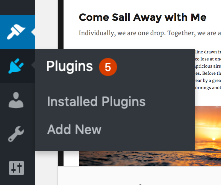
SEO Spam Hacks and SQL Injections are some of the common hacks executed through these editors. To locate the editor, you need to go to Appearance > Editor. And Plugins > Plugin Editor.
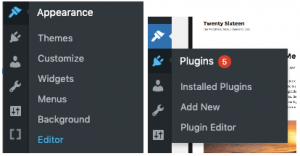
Go to the wp-config file to disable the editor. The same method, in which we accessed files of the website through File Manager or FTP, can be used here.
For the next part, if you have technical knowledge poorly Coded Themes and Plugins then it will definitely come handy, but if you don't then it is better not to go ahead with this. If you want to proceed further using the manual method, here are the detailed steps you need to carry out.
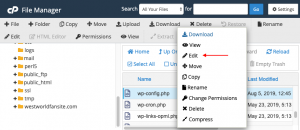
Find your wp-config file in your File Manager and right-click to have the 'Edit' option.
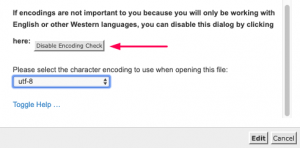
Here you will see additional information about it and you can ‘disable encoding check’. Then proceed to ‘Edit’.
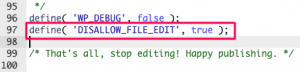
At this stage, your wp-config file is open, you need to scroll down and find the line
/*That’s all, stop editing! Happy publishing. */
You need to paste the following code above this
define( ‘DISALLOW_FILE_EDIT’, true );Now save the changes you have and close the editor.
Head back to the dashboard, here you will see that you no longer have the option of Editor.
5. Change WordPress Security Keys
WordPress tends to store all your credentials so that you don't have to enter them every time you log in. The best part is that all your credentials are stored in an encrypted form. On the contrary, if the data is stored in plain text, it will be much easier for the hacker to interpret it. And on the other hand, if the data is encrypted, it will seem like random text and he will not be able to use it.
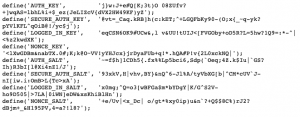
WordPress, using security keys and salts, encrypt the data. In simple terms, keys can be defined as random variables that encode user name and password. Salts just go one step further and improves the encryption.
It is recommended that you make changes to your old keys at regular intervals. To have a fresh set of keys, you can use the link - Secret Key. You will have the page that looks like this:
6. Disallow Plugin Installations
A user or a client may, without a reason, install a plugin without knowing its compatibility and reliability. This action can lead to numerous issues on your website. If you choose to disable plugin and theme updates, you will be able to protect yourself from getting into this situation.
7. Use a Security Plugin
You can easily able and disable this function with the help of a plugin. This is a necessary one especially when you don't want your client to install the plugins unreasonably.
8. Auto Logout Inactive Users
You will find this feature particularly with bank official websites where they log you out following a particular period of inactivity. This way your account will be safe from unauthorized access. Besides, inactive users will be automatically logged out if they are logged in but haven't carried out any task on the website.
You can do this by using a plugin called Bulletproof Security. This plugin comes with a host of features, one of which is the idle session logout.
9. Disable XML-RPC
XML-RPC, of late, has become one of the major targets of brute force attacks. As per one of the methods of this XML-based protocol, system.multicall method can be used to carry out several methods inside a single request. This will prove helpful as you can easily pass on many commands within one HTTP request.
Yes, there are a couple of plugins such as Jetpack that are dependent on XML-RPC however, this won't be required by the majority of the people, and disabling access to it can be beneficial.
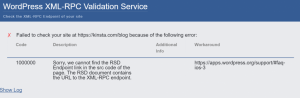
You can run your website through XML-RPC Validator to make out whether XML-RPC is enabled. In case, it is not then you will receive the following message on your screen:
You can also install a Disable XML-RPC plugin to completely disable it.
10. Check File and Server Permissions
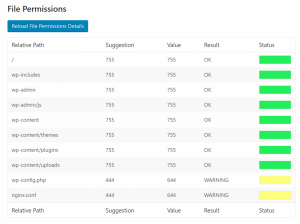
File permissions, on your installation and web server, should not be overlooked. Make sure you lock down your permissions, if not then it will be easier for the hacker to gain access to your website and execute malicious activities. On the other hand, you have to ensure that they are not too stern, or else it may break the functionality of your WP website. So, make sure you have set the right permissions.
File Permissions:
- If the user enjoys the right to read the file, then read permissions are allocated.
- If the user enjoys the right to write or make changes to the file, then write permissions are allocated.
- If the user enjoys the right to run or execute it as a script, then execute permissions are allocated.
Directory Permissions:
- If the user enjoys the right to access the contents of the identified folder, then read permissions are allocated.
- If the enjoys the right to read and delete files in the identified folder, then write permissions are allocated.
- If the user enjoys the right to access the actual folder and can perform both functions and commands, then execute permissions are allocated.
11. Use SSL for Data Security
When you enable SSL (Secure Sockets Layer) security, you take one giant leap towards making your website secure. SSL is responsible for all the information sent to and from your website. That way the data shared by your visitors will remain safe and secure.
The best thing about using SSL is that it ensures that the hacker can't see and intercept the data shared by your users. Secure Sockets Layer tends to create a safe tunnel and it performs a significant role in safeguarding key information such as credit card details, usernames, and passwords.
The URL of an SSL certified website will start with HTTPS and on the other hand, a website that is not certified by SSL will start with HTTP.
Conclusion
Irrespective of the size of your website, you have to incorporate effective ways to harden your WordPress website security. Your website is a part of a virtual world that is plagued with bad elements from our real world.
Bad bots and hackers are continuously on a lookout for vulnerable prey and the moment they get one, they will take advantage of it. Security is an ever-changing landscape, and vulnerabilities evolve over time. Hackers take advantage of WordPress exploits like WordPress Pharma Hack, WordPress XSS Attack, Japanese Keyword Hack in WordPress site. That's why it is necessary to follow some effective ways to harden WordPress Security.
But you don't need to be worried sick, follow the above-discussed website hardening measures to safeguard your website from the hackers.